
OryxOS
One runtime. A team of agents.
Define an agent with configuration. Bring model access, reasoning, memory, tools, and audit into one Agent Harness OS. Built for private environments, starting with a single-node runtime.
Current status: nine-module scaffold, CLI version entry, and HTTP application startup are ready. Agent capabilities are under development.
From model responses to agent work
Connecting a model is the beginning. Running agents takes context, controlled tools, and durable state.
① How does an agent run reliably?Control the reasoning loop, preserve memory, constrain tools, and record what happened.
② How do agents share infrastructure?Share model access, tools, and business integrations while defining each task through configuration.
OryxOS focuses on the runtime so teams can focus on the work their agents should do.
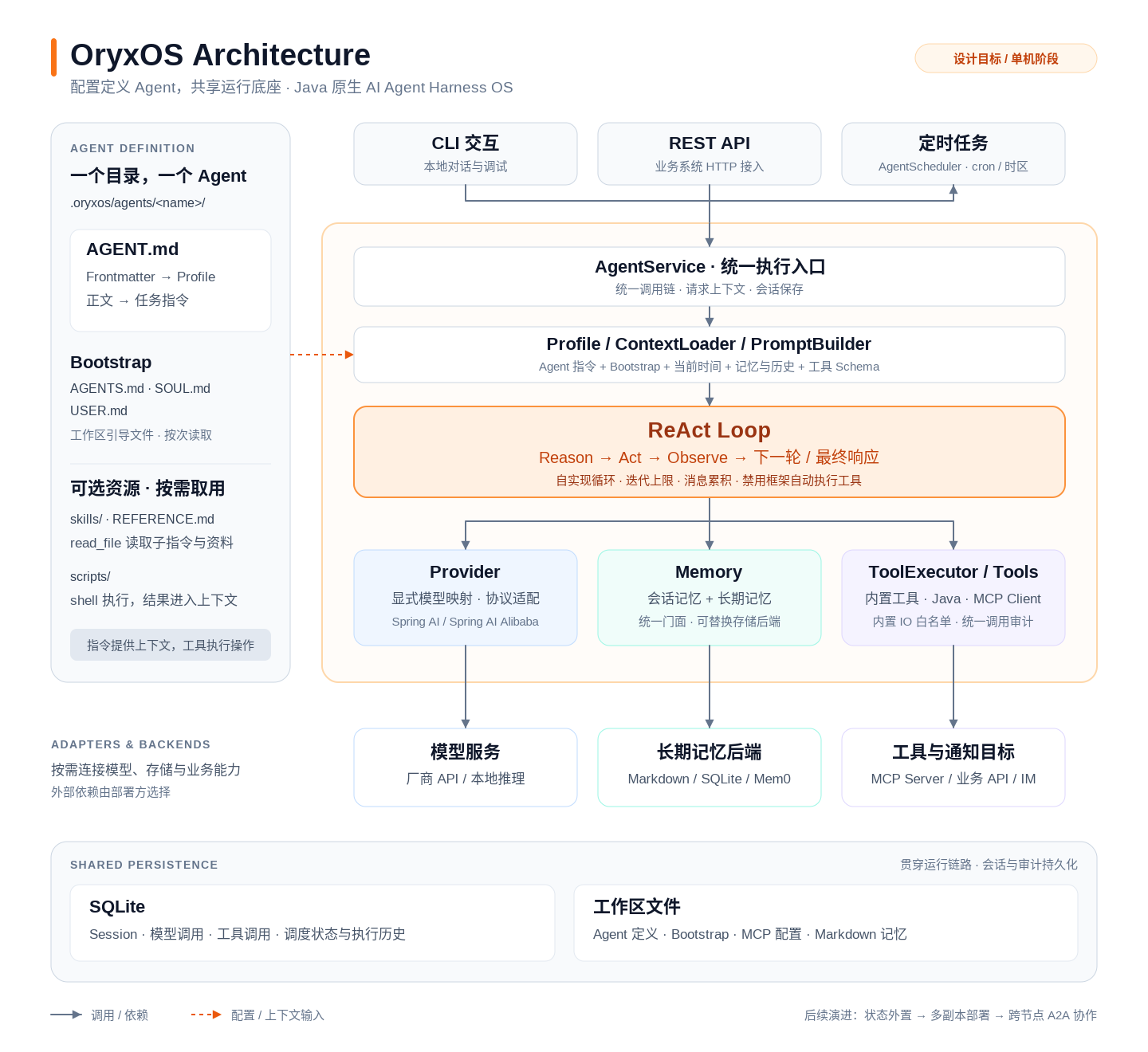
Single-node target architecture · Explore the design
Five capabilities. One execution loop.
The runtime design below is being implemented and validated incrementally.
Provider
Explicit routing · model adapters
Agent Profile
  → ProviderService
  → Named ChatModel
→ Model API / local inferenceReAct loop
Own the loop · observe tool results
Reason → Act → Observe
   ↑                │
   └────────────────┘
Final response / iteration limitMemory
One interface · pluggable stores
MemoryService
  ├─ Session history
  └─ Long-term memory
Markdown / SQLite / Mem0Tools & MCP
Files · Shell · HTTP · memory · notifications
Model tool call
  → ToolExecutor → OryxTool
  → Built-in / Java / MCP
→ Result + audit recordWeb Service
REST API · integrate with your systems
CLI / REST / Scheduler
  → AgentService
  → ReAct + Provider + Memory + Tools
→ Response + persisted sessionShared infrastructure. Different agents.
Start with three planned validation demos, then extend to enterprise use cases.
Daily weather
Fetch the weather on a schedule, prepare clothing suggestions, and send a notification.
Technology digest
Use remembered interests and on-demand editorial instructions to prepare a daily news digest.
GitHub digest
Run a bundled collection script and turn structured results into a project digest.
Operations assistant
Connect logs, monitoring, and operational tools to investigate alerts and record the work.
Engineering assistant
Access code and review data through MCP to prepare change summaries and suggested next steps.
Knowledge assistant
Combine internal search tools with user context to help teams find relevant knowledge.
Customer insights
Connect CRM and business APIs to assemble customer context into a briefing.
Business analysis
Use controlled data tools and business instructions to prepare analytical summaries.
Three ways to extend. Pick what fits.
Instructions + existing MCP
Describe a task in an Agent directory and reuse existing tools. Start with Markdown and configuration.
agents/my-agent/
├── AGENT.md
├── skills/
└── scripts/Custom MCP server
Wrap your business systems in your preferred language and expose tools through MCP.
Python · TypeScript · Go
Java · Rust · …

MCP → OryxToolNative Java tools
Expose Java methods with @Tool and reuse Spring beans and existing enterprise services.
@Tool
Java method
  → JSON Schema
→ ToolExecutorConnect your systems over HTTP
Ten REST endpoints planned for the first stage. These endpoints are not implemented in the current scaffold.
POST /api/v1/sessionsCreate a sessionPOST /api/v1/sessions/{id}/messagesSend a messageGET /api/v1/sessions/{id}Read conversation historyDELETE /api/v1/sessions/{id}Archive a sessionPOST /api/v1/agents/{name}/invokeInvoke an agentGET /api/v1/profilesList profilesGET /api/v1/memoryRead long-term memoryGET /api/v1/toolsList toolsGET /api/v1/healthHealth checkGET /api/v1/infoRuntime informationStart with a local build
Clone the repository and run the current scaffold with JDK 21 and the Maven Wrapper.
./mvnw clean package

# CLI
java -jar oryxos-cli/target/oryxos-cli-1.0.0-SNAPSHOT.jar

# HTTP application skeleton
java -jar oryxos-boot/target/oryxos-boot-1.0.0-SNAPSHOT.jar